
Privacy & Sharing
Does Discord Remove Metadata from Photos? We Tested JPG, PNG and WebP
Our file tests show why Discord attachments and saved previews can retain different metadata, including EXIF and ComfyUI workflows.

Does Discord remove metadata from photos? Not consistently across the files and saving methods we tested. Our JPG attachment lost its EXIF block but retained XMP. Our PNG attachment kept its ComfyUI prompt and workflow, byte for byte. Our WebP attachment lost the EXIF block containing its workflow without changing its dimensions or decoded pixels.
Saving the displayed image from the chat produced different results again. That distinction matters if you are checking a photo for privacy or trying to share a reusable AI workflow.
We tested three public reference images in a private Discord channel using desktop Chrome on September 13, 2026. This is a report about those files and paths, not a guarantee for every Discord client. The cover is a generated conceptual illustration, not a test image or Discord screenshot.
What our Discord metadata tests found
We used the normal Upload a File menu and sent the three images without editing the attachments. We then opened each attachment link in a separate browser tab and saved the image. These are the attachment results, separate from the chat-preview saves discussed below.
| Field | Before sharing | Downloaded attachment |
|---|---|---|
| JPG photo | EXIF, XMP, Photoshop APP13 and ICC; 61,720 bytes. | EXIF block removed; XMP, APP13 and ICC retained; 50,814 bytes. |
| ComfyUI PNG | Prompt and workflow in PNG text chunks; 1,257,779 bytes. | Prompt and workflow retained. Entire file unchanged: 1,257,779 bytes. |
| ComfyUI WebP | Prompt and workflow in EXIF; 1,093,418 bytes. | EXIF block removed, including both entries; 1,053,484 bytes. |
The PNG result is especially important: its downloaded attachment had the same SHA-256 hash as the uploaded file. It was not merely a picture that looked the same. Its embedded workflow and prompt values were still present and unchanged.
Conversely, the WebP image lost the same kinds of AI information because, in that sample, they were stored inside EXIF. A useful answer to “does Discord delete image metadata?” therefore needs to name the format, the fields and the downloaded copy being examined.
A saved preview is not the same as the attachment
For the PNG sample, we compared two saving paths. Right-clicking the displayed image in Discord and choosing to save it produced a WebP file. Opening the attachment link first and saving from that separate image page produced the unchanged PNG.
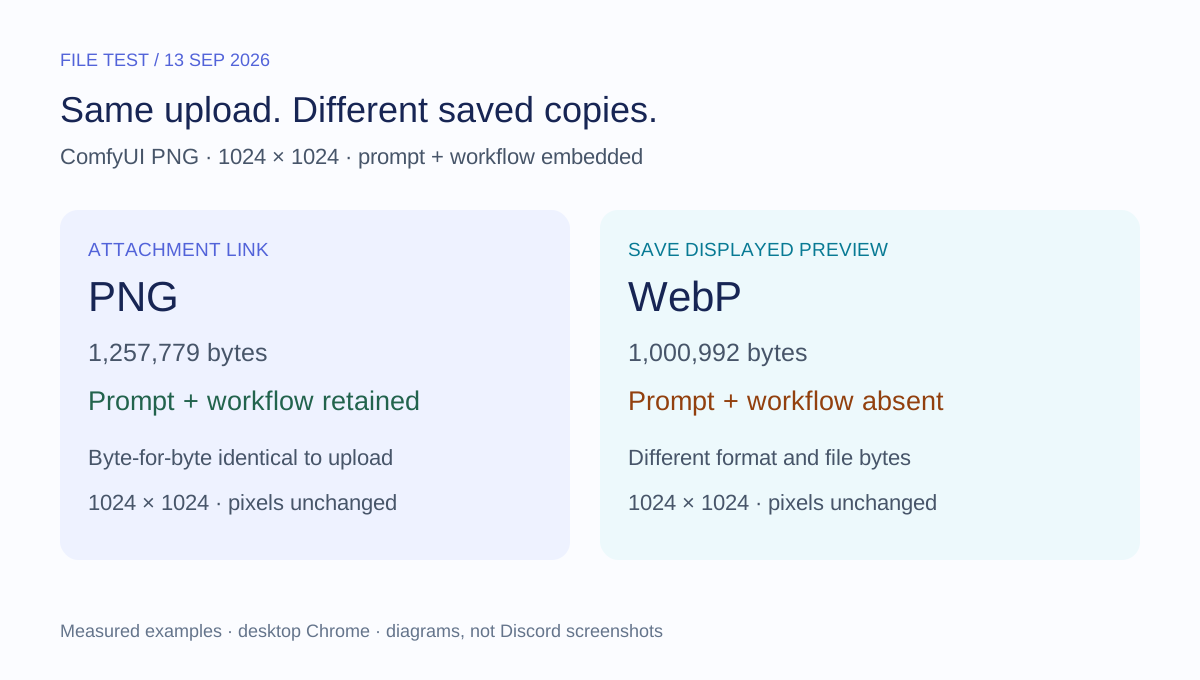
The saved preview was 1,000,992 bytes and contained a WebP VP8L image chunk, with no EXIF or XMP chunk. The original PNG and its attachment were 1,257,779 bytes and contained two text chunks: prompt and workflow.
This is an easy way to reach the wrong conclusion. If we had inspected only the preview, we could have said the workflow was gone. Yet the attachment available through the same message still contained it.
To repeat the distinction, expand an image and look for Open in Browser, if that control is available in your interface. In our test, the attachment opened as an image on cdn.discordapp.com. Save that image and inspect the resulting file. Record the actual format and dimensions rather than relying on the filename alone. Renaming a .webp file to .png does not turn it into the original attachment.
Removing EXIF does not mean removing every metadata layer
The JPG photo contained camera and timestamp entries in EXIF, plus separate XMP, Photoshop APP13 and ICC data. Its downloaded attachment no longer contained the EXIF segment. The other three segments were still there, with exactly the same data hashes as before upload.
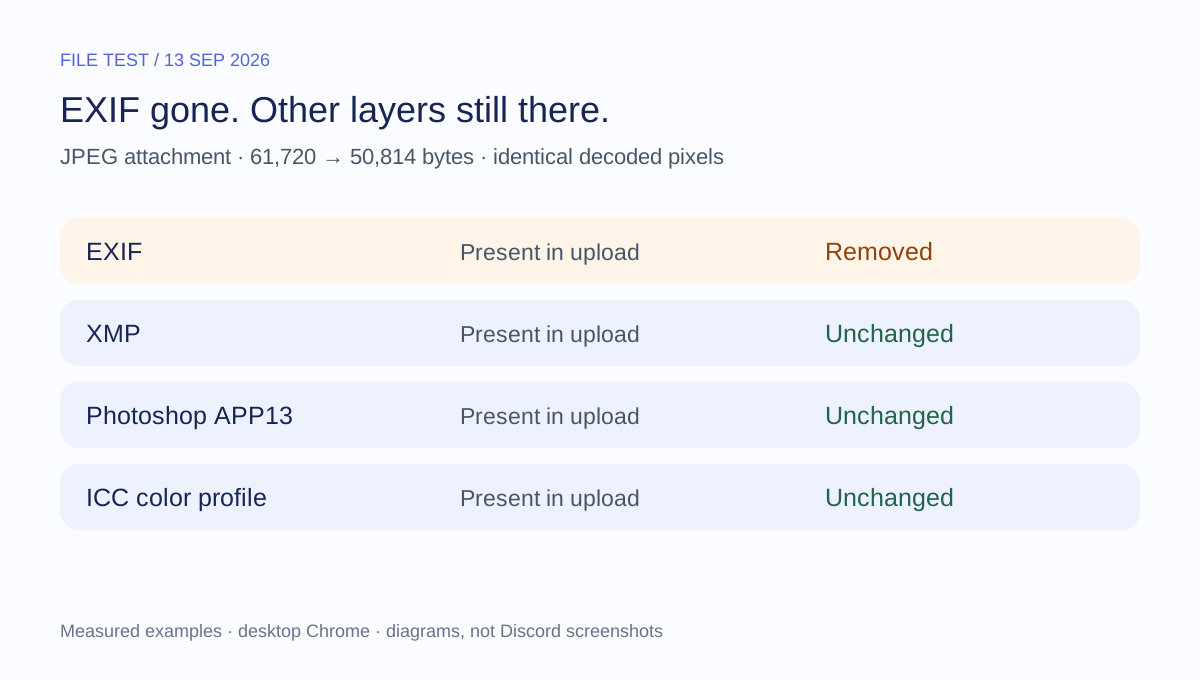
For example, the retained XMP still identified Adobe Lightroom as the creator tool and contained an editing-history parameter reading “saved to new location.” Neither entry establishes that the image was AI-generated. They show that removing one metadata block did not remove all the file's editing information.
ICC profiles describe color rendering and are not interchangeable with GPS or camera identity. Likewise, the presence of APP13 is not enough to name every field it contains. We report the unchanged container, not an invented list of private details.
This is why an EXIF-only check is too narrow for a broad privacy claim. Use an image metadata inspector to examine the supported fields in the exact file you intend to share, and pay attention to what the reader does not recognize.
What happened to the WebP workflow?
Our source WebP was a static 2048 × 3072 image. It stored ComfyUI workflow and prompt data in EXIF. The attachment downloaded from Discord remained 2048 × 3072, and its decoded RGBA pixels matched the source exactly. Its EXIF chunk, however, was absent.
The chat-preview save was different: it was only 1024 × 1536 and 252,062 bytes. It also lacked the workflow, but it was a smaller image, not evidence that the full-size attachment had been resized.
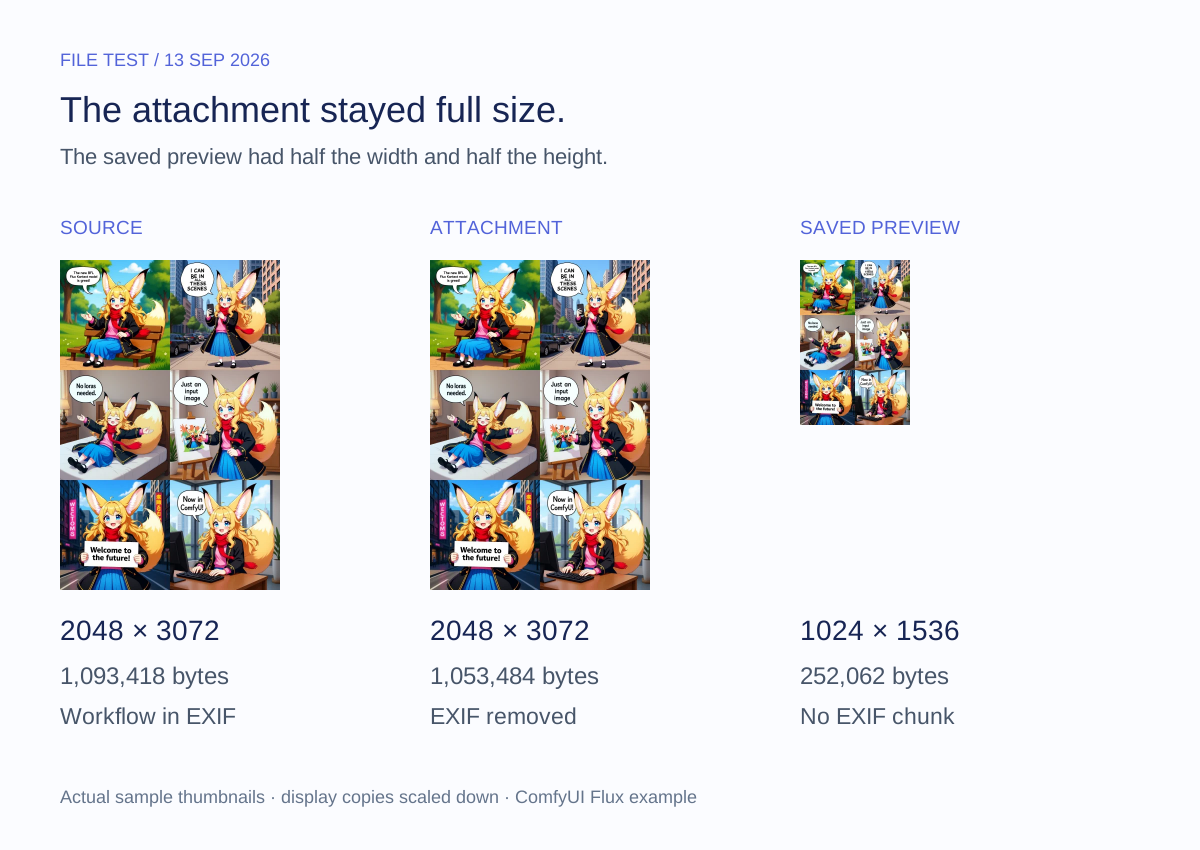
For someone sharing a ComfyUI workflow, these results are practical: a picture that still looks correct may no longer carry the data needed to load its workflow. Our ComfyUI image metadata guide explains how to inspect those records without assuming every workflow uses the same structure.
For someone concerned about privacy, the opposite lesson also matters. The PNG attachment kept those records even though its preview did not. Do not use the preview's empty result as proof that the message's attachment is equally clean.
How to check a photo before sharing it
Check the file before uploading, rather than depending on Discord to remove a particular field. Our AI metadata inspector can help identify supported prompt, workflow and other embedded records locally in your browser.
- Keep the source file. Preserve any workflow or provenance information you may need later.
- Inspect the intended sharing copy. Look at the actual entries, not just a single “metadata found” indicator.
- Clean a separate copy if needed. Our tested metadata-removal guide walks through inspection, cleanup and reinspection.
- Recheck the downloaded result. Confirm the desired fields are gone and the image still meets your needs before sharing.
- If testing Discord itself, record the saving path. Keep attachment downloads and displayed-preview saves separately named.
A file check does not inspect the account, message history or Discord's server-side storage. Removing embedded information also does not remove sensitive details visible in the picture. Review the pixels as well as the metadata.
How we tested, and what this does not prove
We used a newly created private channel with no other members. All uploads and attachment retrievals used the same account. We did not independently test what a second recipient account receives, mobile apps, Nitro options, direct messages or every possible upload method.
The samples came from public reference sources, not personal uploads:
- JPG: the C2PA public test-file collection's Adobe A sample, used as an ordinary-metadata control without Content Credentials.
- PNG: the official ComfyUI SDXL example, with prompt and workflow text chunks.
- WebP: the comic example on the official ComfyUI FLUX examples page, with EXIF-based workflow and prompt data.
We compared file sizes, SHA-256 hashes, actual formats, dimensions and decoded RGBA pixels using Sharp. The project's reader inspected fields, and a separate binary container scanner checked JPEG segments and PNG/WebP chunks. We did not execute the embedded workflows or treat their declarations as independently verified creation histories.
The machine-readable evidence summary records source and output hashes, dimensions, byte counts and retained containers. It omits account details, signed Discord attachment URLs and full embedded workflows. The body figures summarize those measurements; they are not platform screenshots.
There was no identified GPS field in our JPG control, so this is not a GPS-removal test. None of these observations establishes what Discord retains internally, whether a pixel watermark survives, or whether an AI detector will classify an image differently. Our comparison concerns the files we saved, not every copy held by the service.
Frequently asked questions
Does Discord remove all metadata from photos?
No such conclusion follows from our tests. The JPG attachment retained XMP and other segments, and the PNG attachment retained its complete prompt and workflow. Even when EXIF disappears, other information may remain.
Does Discord delete metadata from PNG images?
Our tested PNG attachment was unchanged, including its two metadata text chunks. Its saved chat preview was a different WebP file without those records. Specify which copy you inspected before drawing a conclusion.
Can someone obtain AI prompts from a Discord image?
In our test, the downloadable PNG attachment still contained the recorded prompt and workflow. We verified that using the uploading account; we did not run a second-account access test. A file without those records cannot supply them through ordinary metadata inspection, and metadata alone does not reveal every step of an image's history.
Does Discord remove GPS location from photos?
We did not test a GPS-bearing sample. Although our JPG lost its EXIF block, that single result is not a universal GPS guarantee. Inspect and, if necessary, clean location data before upload rather than relying on a platform assumption.
Does downloading from Discord reduce image quality?
The three attachment downloads retained their original dimensions and decoded pixels in this test. One displayed-preview save was smaller, while another changed format without changing decoded pixels. Those are different outcomes; file size alone does not tell you which occurred.
Does missing metadata mean the image was not AI-generated?
No. Metadata may be absent, stripped or unsupported by the reader. Our two preview copies illustrate how recorded AI information can disappear while the image remains. An empty scan is not proof of a non-AI origin or a promise of detector avoidance.
Related articles

Privacy & Sharing
Do Screenshots Have Metadata? What They Keep, Drop, and Reveal
Screenshots can contain metadata, but usually not the original photo's EXIF or GPS. Learn what survives, what changes, and what to check before sharing.

AI Metadata & Content Credentials
ComfyUI Image Metadata: How to Read Prompts and Workflows
Read three real ComfyUI example files to understand prompt and workflow JSON, follow generation settings, and see what survives a PNG export.
AI Metadata & Content Credentials
How to Remove AI Metadata from Photos: A Tested Guide
Follow a real ComfyUI image from its original prompt and workflow data to a cleaned download, then check exactly what changed.