

Remove
Our C2PA remover marks recognized embedded credentials and JUMBF structures for cleanup from bytes in this copy. It reports file evidence rather than predicting origin.
Use the free C2PA remover to inspect supported embedded Content Credentials in JPG, PNG, WebP or HEIC/HEIF files. You can remove C2PA metadata locally, process up to 10 images and rescan every output before download without uploading image contents.
File evidence
Before C2PA removal, the tool reads the file itself instead of guessing from a generator name or visible style. This evidence helps you decide whether to remove C2PA from the copy.
Our C2PA remover marks recognized embedded credentials and JUMBF structures for cleanup from bytes in this copy. It reports file evidence rather than predicting origin.
Display-critical structures remain when required. Keep original retains the tested image payload without recompression.
Unknown structures are not deleted blindly. Warnings identify data that may remain, limiting the result to demonstrated coverage.
Container map
Content Credentials are signed provenance records associated with an asset. In supported images, the manifest is embedded in a format-specific container rather than painted into the visible picture.
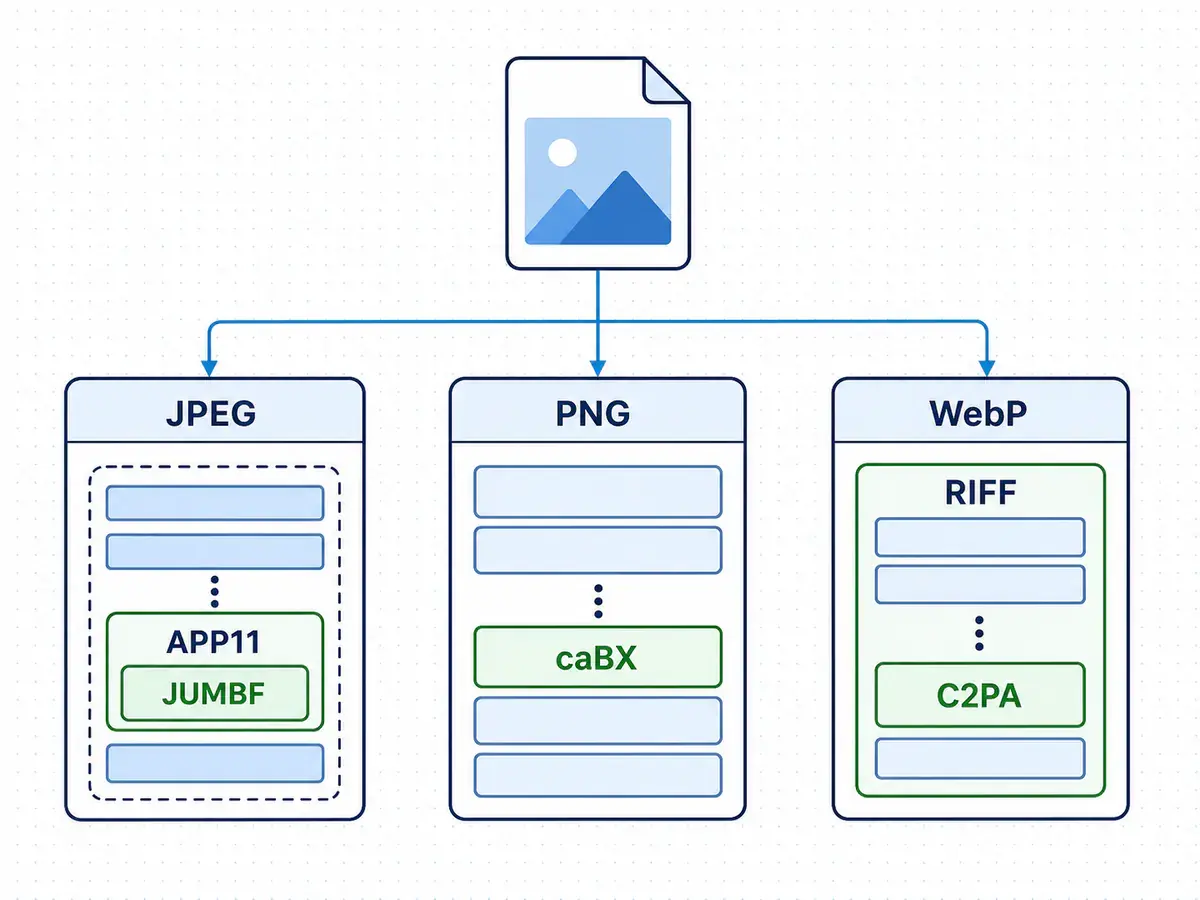
A credential can describe origin, edits and software. Its manifest travels as structured file data. C2PA is not a blockchain, and an embedded record differs from a pixel-level watermark such as SynthID. A C2PA metadata remover can inspect supported containers without claiming to analyze the picture.
A C2PA remover follows each format’s container rules, reports what it finds and applies a conservative policy. Use the inspection report to decide whether to remove C2PA from that copy. No match means no supported embedded credential was found; it cannot prove provenance never existed elsewhere.
JPEG carries C2PA data through APP11 marker segments that assemble a JUMBF manifest store outside compressed image scans.
PNG places its manifest store in the ancillary caBX chunk outside decoded pixels.
WebP stores provenance in a C2PA RIFF chunk separate from VP8 or VP8L image bitstreams and VP8X extended-header data.
Removal scope
When you remove C2PA, the selected output path and the safety of each structure determine the result. The table describes the actual policy, including changes beyond the provenance manifest.
| File area | What it contains | Why it matters | Current handling |
|---|---|---|---|
| Supported embedded C2PA | Recognized Content Credentials, manifest stores and related JUMBF structures embedded in the file. | These are the file-local records a C2PA remover is designed to target. | The C2PA remover clears supported embedded C2PA structures and then checks the output again. Unrecognized variants can remain with a warning. |
| Tested image payload | Compressed or lossless data needed to render the original format. | A metadata edit should not silently recompress the picture. | Keep original preserves the tested image payload without recompression while rebuilding necessary structure. |
| Converted output | A newly encoded static result in the format selected by the user. | Conversion can change compression, animation, color or pixels. | The browser re-encodes converted output, so it is not necessarily identical to the source even when it looks unchanged. |
| Other or unknown metadata | Supported EXIF, GPS, XMP, IPTC, PNG text and uncertain structures. | The page shares one safe cleanup policy with the general image tool. | Cleanup also removes supported EXIF, GPS, XMP, IPTC and PNG text targets. Necessary display data and unknown metadata may be preserved or reported. |
Local evidence chain
Reliable C2PA removal depends on a fresh inspection of the downloadable bytes, not merely on a cleanup call returning without an error.
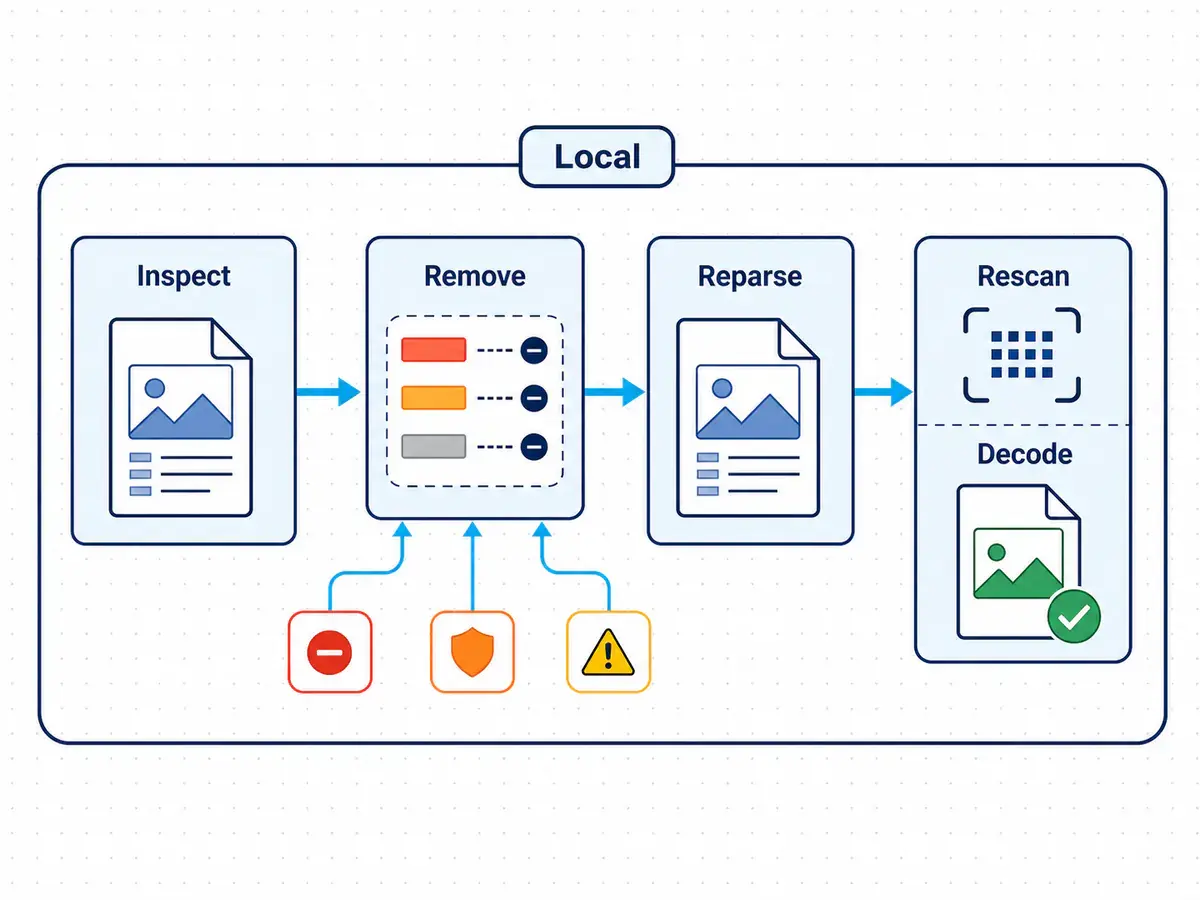
After cleanup, the C2PA metadata remover reparses the output and performs a target rescan for supported C2PA, JUMBF and selected metadata structures. This reparse and rescan checks the downloadable file instead of trusting an intermediate result.
The same pass confirms format and dimensions, then asks the browser to decode the image. Only a path that passes its applicable checks receives the local status. Verified cleanup does not validate authenticity or a certificate chain, author identity, source history or signature trust.
Open the cleaned bytes again and reparse the resulting container.
Run a target rescan to confirm that this C2PA remover cleared the recognized structures selected by the cleanup policy.
Confirm that the output format and dimensions agree with the requested downloadable result.
Decode the final image and confirm it can display before marking cleanup complete.
Honest limits
C2PA removal changes a local file within a precise boundary. It cannot remove C2PA signals stored elsewhere, inferred from pixels or retained by a publishing service.
| Signal | Where it exists | Current result | What to expect |
|---|---|---|---|
| Embedded manifest | A supported embedded manifest in this image container. | It sits inside the processed bytes. | Recognized structures are cleaned and rescanned; uncertain structures may remain with a warning. |
| External manifest | A manifest stored outside the downloaded image. | It is not part of the local file. | A C2PA remover cannot alter an external manifest because it remains outside the local result. |
| Soft binding | A content-derived identifier, such as a perceptual fingerprint or invisible watermark, that can match a rendition to an external manifest. | A file edit cannot inspect every binding mechanism. | A soft binding may remain; this tool does not remove it or guarantee it will disappear. |
| SynthID / pixel watermark | SynthID or another pixel watermark encoded in visual signals rather than metadata. | These signals require different techniques. | The tool does not remove SynthID. It does not strip a pixel watermark or claim to affect its detection. |
| Visual detector | A visual detector score inferred from pixels or style patterns. | Detector analysis may not depend on embedded credentials. | A detector may still classify the image. Cleanup is not designed to bypass it. |
| Platform record or label | A platform database record, cached analysis or existing disclosure label. | The service controls data stored outside this file. | A platform record or label cannot be deleted or changed by cleanup. The tool also cannot guarantee how a new upload will be presented. |
Responsible copies
Use C2PA removal only on files you may modify, and keep an original when provenance matters. Journalism, forensics, compliance, audit or client requirements may require Content Credentials. This is general information, not legal or compliance advice.
Strip supported embedded credentials from a private copy for sharing only when you control the source and workflow details are unnecessary. Retain the credential-bearing original if its history may matter later.
Use C2PA removal for a client delivery copy only when the agreement permits it. A client, publisher or archive may instead require the signed record.
Remove C2PA from a published copy of your own photograph after a light AI edit only when that choice is appropriate. This cannot make the image human-made or erase external disclosure duties.
Questions and answers
Compare C2PA removal, supported files, local verification and practical limits before cleaning a copy.
Use the free C2PA remover to inspect the file, review the cleanup plan and download the locally rescanned result.